
Mac Audio Routing That Just Works
Soundshine is a macOS menu bar app that lets you share your system audio (music, videos, game sounds) as a microphone input in Zoom, Google Meet, FaceTime, Discord, and any other app, with low latency and no wires.
The Soundshine family
Three apps. One clean audio toolkit.
Route audio into any app, record any audio to a file, or fix sound that stopped working. All native to macOS.
Route sends audio into other apps. Record saves audio to a file. Doctor fixes Mac sound problems, and it is free.
Soundshine Route
Turn your system audio into a microphone input for Zoom, Meet, Discord, and any app.
- One-click routing from the menu bar
- Low-latency passthrough, you still hear everything
- One-time $11.99, lifetime license
$11.99 one-time
Soundshine Record
Capture system audio or specific apps, plus your mic, in a single file.
- Record any source, no virtual driver to install
- Per-source volume, meters, and live monitoring
- Save as AAC, WAV, or AIFF
$14.99 one-time
Soundshine Doctor
Find out why your Mac's sound is wrong, and fix it with one click.
- Checks output, volume, Bluetooth, and microphone at a glance
- Quick Fix for no sound, crackles, and muffled headphones
- Nothing is recorded, and nothing runs without your click
Free
Want both? Get the Soundshine Bundle.
Route and Record together for $19.99 one-time instead of $26.98, with a license key for each app.
The Problem
The Problem
You're on a Zoom call and want to share a song, a video clip, or a sound effect. macOS doesn't let you route system audio to a microphone input. You end up holding your phone to the laptop speaker, or googling "virtual audio cable mac" and finding confusing tools from 2015.
The Solution
The Solution
Soundshine creates virtual audio devices on your Mac. Flip one switch and your system audio becomes a microphone input that any app can use. You still hear everything through your speakers, because Soundshine handles the passthrough transparently.
How It Works
How It Works
Install, toggle, select. Done.
30 sec
Setup time
1
Routing switch
Low
Latency
Install
A guided setup wizard installs a lightweight audio driver. Takes 30 seconds, two admin password prompts.
Toggle
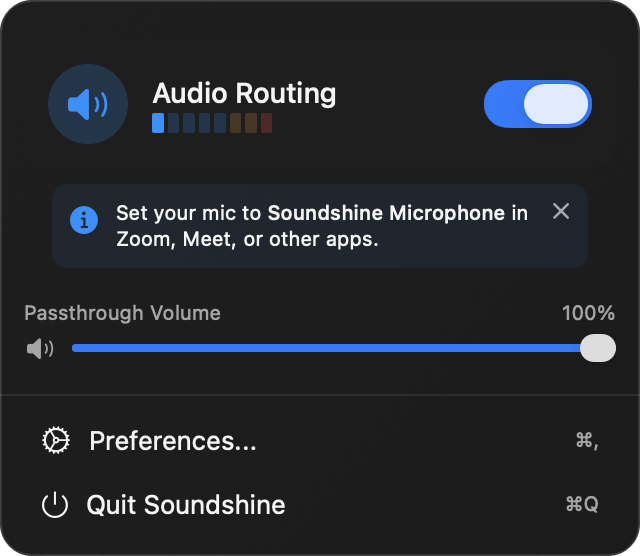
Click the menu bar icon and flip the routing switch to "on."
Select
In Zoom/Meet/Discord, choose "Soundshine Microphone" as your mic. Done.
Key Features
Key Features
One-Click Audio Routing
A single toggle in the menu bar routes all system audio to a virtual microphone. No complex configuration, no DAW knowledge, no cables.
Low-Latency Passthrough
When routing is active, you still hear everything through your real speakers. Soundshine captures and passes audio through simultaneously with no perceptible delay. Your Mac's volume keys keep working normally.
- 32-bit float, 48 kHz stereo audio
- Real-time audio level meter in the menu bar
Passthrough Volume Control
Adjust how loud audio plays through your speakers independently from the routed audio. The volume slider in the menu bar controls your local playback without affecting what others hear.
Menu Bar Native
Lives in your menu bar. No Dock icon, no window clutter.
- Routing toggle with clear active/inactive states
- Real-time audio level meter
- Passthrough volume slider
Full Accessibility
Complete VoiceOver and keyboard support. Respects your system accessibility preferences including Reduce Motion.
Use Cases
Use Cases
Soundshine works wherever you need to route audio.
Recording
Capture any audio playing on your Mac in QuickTime, OBS, Audacity, or any recording app.
Presentations
Share a video or demo audio in Zoom/Meet without screen sharing.
Podcasting
Route sound effects or music clips into your recording app.
Gaming
Share your gameplay audio with friends on Discord.
Pricing
Pricing
Free Trial
All features, free. A periodic audio watermark is the only limitation. Try it free. No signup, no credit card.
- Watermark does not affect your local speaker audio, only the routed microphone feed
One-Time Purchase
$11.99
Buy once, use forever. No subscription. Enter a license key to remove the watermark permanently.
- Transfer your license between Macs anytime
Want both? Get the Soundshine Bundle.
Route and Record together for $19.99 one-time instead of $26.98, with a license key for each app.
Technical Specs
Technical Specs
Ready to route
Audio routing that just works.
Try Soundshine free with all features. Buy a license when you're ready to remove the watermark.
Need both apps? Get Route and Record for $19.99